Plugin Purchase, License Update & Transfer to Another PC
Updated on August 17, 2026
Applies to: Handy Backup
Will I still have access to my backups after the 30-day trial period?
Upon the expiration of our backup software trial period, Handy Backup stops working, but your backups remain intact.
- Unencrypted backup. Yes. Your backup files remain in the storage location you selected, so you can access them there even after the trial period ends. The program saves your backups in native format, so you can access your files directly through Windows File Explorer.
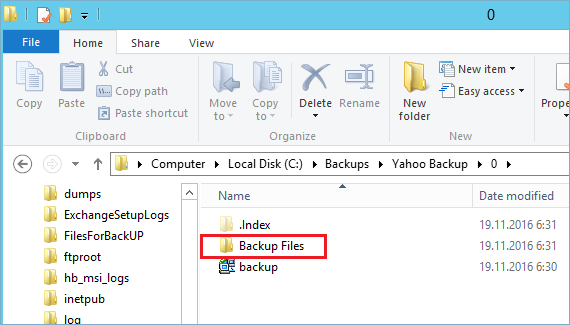
- Encrypted backup. You do not have access to your files until you decrypt them using Handy Backup. In this case you need to order Handy Backup.
If you have any problems, send us a email to [email protected] explaining your problem.
How can I purchase an additional plug-in for my Handy Backup edition?
To order a plug-in you should go to our Order Handy Backup Plug-in section and follow the next steps:
- Select the plug-in you want to purchase and click "Buy Now".
- You will be redirected to buy.handybackup.net, where you need to enter the registration key for the Handy Backup license you want to upgrade.
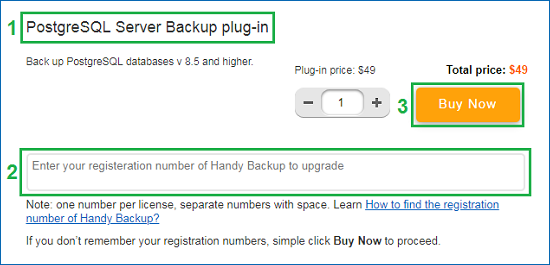
If you do not remember the registration key, you can retrieve it through the Registration Management section. Just select the "Forgot the registration number" option and follow the provided instruction.
- After payment, the plug-in will be automatically added to your Handy Backup solution.
If you cannot retrieve the registration key for the license you want to upgrade, you may leave the key field empty during payment. We can update the license manually. In this case, please contact us at [email protected] and provide the email address used to register the program. We will help you restore your key and add the purchased plug-in to your license.
I have paid for an additional plug-in, but the program still gives an error
After purchasing an extra plug-in for Handy Backup Standard or Handy Backup Professional, the plug-in should be automatically added to your license.
- Please check that you provide a registration number from main version of Handy Backup (Standard or Professional) when purchasing a plug-in. For example, enter your registration number in the field "Enter Handy Backup registration number to upgrade" during checkout at buy.handybackup.net!
- If the plug-in does not appear in your program, it most likely means that the registration number was not entered during purchase. In this case, please send us an email to [email protected], providing your Handy Backup registration number and attaching the email with purchase confirmation. We will help you restore your key and add the purchased plug-in to your license.
Note: If you do not remember your main registration number from the program, please read about how to find the Registration Number of Handy Backup. You can also retrieve it through the Registration Management section by selecting the "Forgot the registration number" option.
How to update to the 8 version and save all tasks and settings?
The architecture of Handy Backup 8 differs drastically from previous versions. Therefore, it is no possibility to convert tasks made under Handy Backup 7.8.1 or earlier versions (including major versions 6 and 5) to the new version 8.
If you use Handy Backup 7.8.2 or upper version, you can export your tasks from the version 7 and then import these tasks* into the version 8:
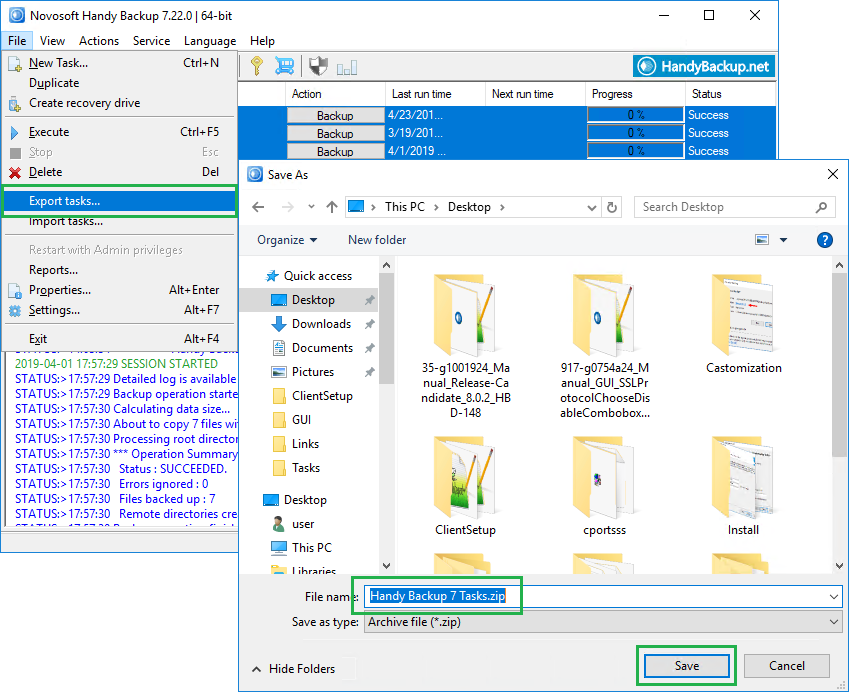
- Start Handy Backup 7 and export tasks to the file.
- Install Handy Backup 8 to your machine.
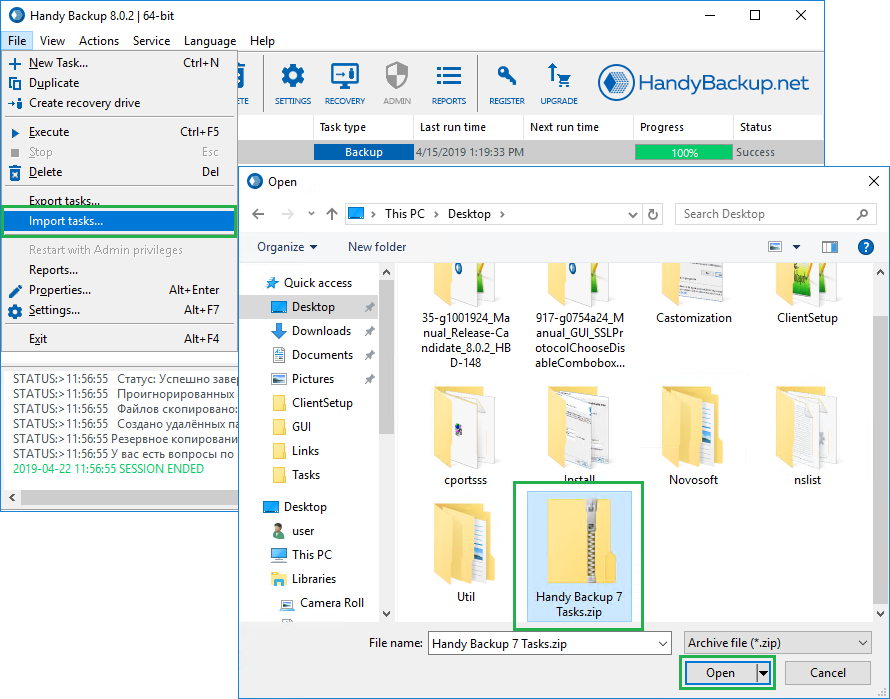
- Import tasks from the export file to Handy Backup 8.
Caution! You cannot import tasks containing MS SQL and Oracle plug-ins, as the version 8 uses completely different principles for database connection via these plug-ins!
* Caveat: You can import tasks only in paid editions of Handy Backup.
If you have Handy Backup 7.8.1 or earlier, and you do not want to create tasks from scratch, then please send us a letter to [email protected]. We will try to help you with task migration.
I have not received a new registration number after updating the program
You don’t need to obtain a different registration number after updating Handy Backup to a newer version or purchasing a plugin. During the update, our database automatically renews the information about your product number, so you can continue using it in a new version of the program.
You do not need to recreate any backup tasks after installing a new version. When you update Handy Backup, it automatically imports all of your old tasks, keeping all backup files accessible.
Can I use a single license on more than one computer?
You can use a registration key on one computer only!
- If you need to install Handy Backup on multiple computers, you must purchase the appropriate number of licenses.
- If you want to move Handy Backup from one computer to another, please reset your registration using our license management form. You can also refer to Migrating to New Computer for detailed instructions.
Important: Once you transfer your copy of Handy Backup to another computer, the previous installation will no longer work.
To back up LAN data, including servers and workstations over a local network, you only need a single registration key. This key is entered on the central management panel of Handy Backup Server Network — no activation is required on remote machines.
If your organization’s IT policies do not allow file sharing, you may be interested in our enterprise backup solution.
How can I move my copy of the program from one computer to another?
Note: Transferring Handy Backup from one computer to another is supported only in version Handy Backup 8.
Transferring your copy of the program from one computer to another. It is a simple task.
First, remove the registration number from your current machine. You can do it by one of three ways. Choose the fastest and most convenient way for you to delete your registration:
- From the program. Click the Register button on the program′s toolbar.

- Then click the Recover registration button, which will open the registration management section of our website.
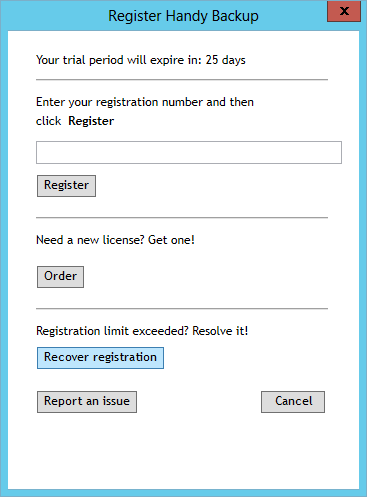
- Select the “Moving registration to another computer” option and follow the instruction provided on the opened page.
- Manual. Go to the registration management section of our website, and select an option for moving your license (“Registering on another computer”). Then follow the instruction provided for you on the requested page.
- Calling for tech support. Please send the e-mail including your name, date of purchasing and your current registering number to the technical support team, using the address [email protected] for the letter.
Note: In a latter case, you must wait for E-mail confirmation of resetting your registering number to proceed.
Then set up a new copy of Handy Backup on your current machine. Register it as usual, using the same number you were using on a previous computer. The new copy will work under exactly the same license as previous instance of Handy Backup.
What to do if I have bought the program on handybackup.com?
The version you have bought on handybackup.com is old and it works only on Windows 95/98/Me or Windows NT 4.0/2000/XP.
If you want to actualize your version so that it would work on MS Windows 11/10/8/7 SP1, Windows Server 2025/2022/2019/2016/2012(R2) and Linux, we can give you a license for our product with a good discount:
- Firstly you should download the latest version of Handy Backup
- Then order the upgrade to the newest version of the program for $14.
If you have any problems, send us a letter to [email protected] explaining your problem.