Plug-in issues
Updated on June 24, 2026
Applies to: Handy Backup
All the plugins have disappeared from the program
If all the plugins have disappeared from the program, then you should do the following:
- Terminate all processes associated with the program in Task Manager.
- If you have Windows Server Backup edition of the program, restart services Novosoft Backup Network Server 8 and Novosoft Backup Network Workstation 8.
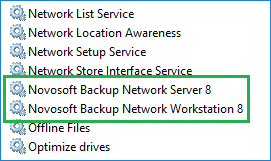
- Now restart Handy Backup.
If you have any problems, send us a letter to [email protected] explaining your problem.
NAS Backup Troubleshooting
Handy Backup can back up files to or from a NAS accessible through Windows Explorer. If you encounter issues with this process, follow these steps for effective NAS backup troubleshooting:
Steps to Connect a NAS for Backup:
- Go to your network settings (Network).
- Ensure your NAS is visible in the Network window.
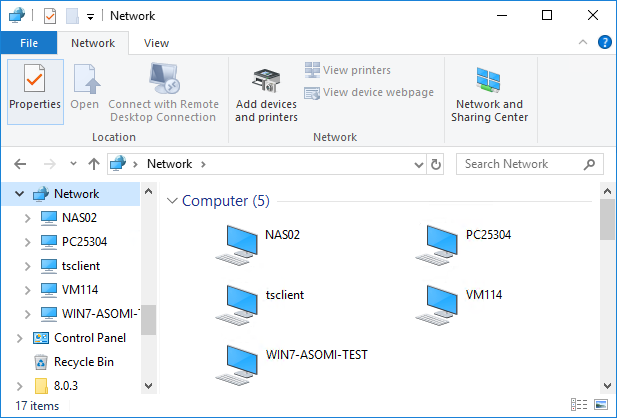
- Open your NAS in the network browser. If prompted for a password, a dialog window will appear.
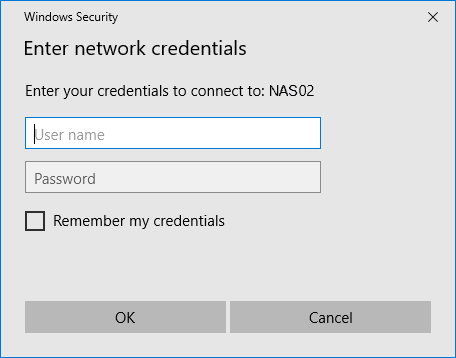
- In the dialog window, enter your NAS login credentials before attempting to connect Handy Backup.
If NAS backup issues persist, please email us with a description and the archived content of the Handy Backup 8 folder to [email protected].
The Handy Backup 8 folder is located at:
C:\ProgramData\Novosoft\Handy Backup 8
NAS Online Backup Instructions
- You can use Handy Backup Network or the Standalone version for NAS online backup. If your NAS operates as a service, utilize the Network plug-in for NAS access.
- For network backup in Handy Backup, navigate to Network\Microsoft Windows Network\WORKGROUP\myNAS.
- If your NAS is identified only by IP address instead of a name, you cannot use service mode for NAS online backup. Explore alternative options.
- When using the server version for NAS backup, ensure network access rights by running the workstation under a specific user, not the system account.
- If working as a process, utilize either the Network plug-in or mapped drives for NAS online backup. Check our FAQ on backup mapped drives for more details.
Related Pages:
Why is the Email plug-in not working?
If your email plug-in does not work, please do the following:
1. Desable your antivirus program and check if the plug-in is working.
Some of the antivirus programs can block requests to the IMAP server, that is why Handy Backup can not work.
2. Find email configurations in your antivirus program and disable them. If it works, then add Handy Backup to the list of exceptions.
If it is still does not work send us a letter to [email protected] containing screenshot of your email plug-in configurations in Handy Backup, the name of your antivirus program and email service.
Related Pages:
Which operating systems does the VMWare plugin support?
The VMWare plugin works on Windows 10/8/7 and Windows Server operating systems. You can easily perform hot backup of data from VMWare virtual machines, servers, and arrays.
Note: VMWare plug-in connection problems possible on the Windows 11 OS. We recommend you to install the free trial version of the program beforehand to test the VMWare plug-in operation on the PC where you plan to backup. If you have any questions, please contact Handy Backup Technical Support:

 Telegram: Handy_Backup_Support