GoDaddy Email Backup Software
Handy Backup is GoDaddy email backup software for creating independent copies of messages from GoDaddy Professional Email accounts. Connect directly to the mail server through IMAP, automate backup tasks, and save emails to storage you control. Back up GoDaddy email to a computer, external drive, NAS, network storage, FTP/SFTP server, or supported cloud service. Messages are stored as standard EML files with their original content and attachments, making the backup accessible independently from the GoDaddy webmail interface.
 Download Trial





Back Up GoDaddy Professional Email Through IMAP
GoDaddy Professional Email powered by Titan supports standard IMAP access. This allows Handy Backup to connect directly to the mail server and copy mailbox messages without first downloading them through Outlook, Thunderbird, or another desktop email client.
For current Professional Email accounts, GoDaddy specifies imap.secureserver.net as the incoming IMAP server, with SSL/TLS security on port 993. Handy Backup uses the account connection to read the mailbox and create an independent backup on the destination you select.

Direct Mailbox Backup
Connect Handy Backup to a GoDaddy Professional Email mailbox through IMAP and protect email folders without relying on a locally installed mail client.

Automatic Scheduling
Run GoDaddy email backup automatically on a regular schedule instead of manually exporting mailbox data whenever you want another copy.

Independent Storage
Keep email backups outside the GoDaddy account on local, network, remote, or cloud storage that remains under your control.
Why Create an Independent GoDaddy Email Backup?

Keep Mail Outside the Email Account
A mailbox and its backup should not have to depend on the same account. Handy Backup lets you copy GoDaddy email to separate storage so important messages remain available even when you cannot access the original webmail environment.

Replace Manual Export with a Schedule
Manual mailbox exports are useful for occasional copies, but they depend on someone remembering to create them. With Handy Backup, a GoDaddy webmail backup task can run automatically according to a daily, weekly, monthly, or custom schedule.

Keep Messages in EML Format
Handy Backup stores email messages in standard EML format. Each EML file preserves the message content, headers, and attachments, allowing backed-up mail to remain accessible without converting the whole mailbox into a single proprietary database.

Protect Multiple Mailboxes
Create separate tasks for different GoDaddy email accounts. Each task can have its own mailbox connection, destination, schedule, encryption settings, and backup history, which is useful when several business addresses need regular protection.
Where Can You Save GoDaddy Email Backups?
A GoDaddy email backup does not have to remain inside another online email service. Handy Backup lets you choose the storage location according to how you plan to protect, retain, and recover your mail.

Local and Network Storage
Save GoDaddy email to a PC, internal disk, external HDD or SSD, USB storage, network folder, or NAS. A local copy is useful when you want direct offline access to backed-up EML files.

Remote and Cloud Storage
Use FTP, SFTP, FTPS, WebDAV, Amazon S3, S3-compatible storage, Google Drive, OneDrive, Dropbox, and other supported destinations to maintain an additional offsite copy.
Back Up GoDaddy Email to Storage You Control
Handy Backup can be used when the goal is not simply to keep another online copy of a mailbox, but to maintain email independently from the original GoDaddy account.

Local access: store messages on your own computer or external drive and browse the resulting backup independently.
NAS and network storage: keep centralized mailbox copies on storage already used by your home or business network.
Offsite copies: send backed-up email to remote servers or supported cloud storage for an additional level of separation.

GoDaddy Professional Email and Microsoft 365 Are Different
GoDaddy Professional Email
GoDaddy Professional Email powered by Titan supports IMAP. This page focuses primarily on this environment because Handy Backup can use the IMAP connection to create scheduled backups of email messages and mailbox folders.
Current GoDaddy IMAP settings:
Server: imap.secureserver.net
Port: 993
Security: SSL/TLS

Microsoft 365 from GoDaddy
Microsoft 365 from GoDaddy is a different email environment. GoDaddy also offers its own Email Backup add-on for Microsoft 365, which can protect Exchange mailbox data including messages, contacts, calendars, tasks, and attachments.
Important: IMAP email backup protects mail messages and folders. It should not be treated as a complete Microsoft 365 backup for contacts, calendars, tasks, and other Exchange data.
GoDaddy Email Backup Options Compared
GoDaddy's own Email Backup service and Handy Backup address different requirements. GoDaddy's service is designed around Microsoft 365 mailboxes, while Handy Backup provides an independent software-based backup path for IMAP-accessible GoDaddy Professional Email.
| Backup Capability | GoDaddy Email Backup | Handy Backup |
|---|---|---|
| Primary GoDaddy email environment | Microsoft 365 | Professional Email through supported IMAP access |
| Automatic email backup | Yes | Yes |
| Choose your own backup destination | No service-managed backup storage | Yes local, NAS, remote, or cloud storage |
| Local or external-drive backup | No | Yes |
| Individual EML files | No managed through the backup service | Yes messages remain accessible as standard files |
| Contacts, calendars and tasks | Yes for supported Microsoft 365 mailbox data | No not through the IMAP email backup method |
| Backup other PC and business data | No | Yes within the same backup application |
GoDaddy Email Backup Features in Handy Backup
Scheduled Backup
Automate GoDaddy email backup instead of exporting mail manually. Configure a schedule that matches how frequently the protected mailbox changes.

Multiple Backup Versions
Maintain more than the latest copy when required, providing additional recovery points if an unwanted change or deletion is discovered later.

Backup Encryption
Protect stored mailbox backups with AES-128 or AES-256 encryption when email content contains business correspondence, invoices, documents, or other sensitive information.

Restore and Migration
Use existing email backups for recovery or migration. Mail saved from one account can be retained independently and used when moving important messages to another mailbox.
Recommended Solution
Lifetime license
Handy Backup Standard
Handy Backup is a GoDaddy email backup tool that automatically protects Professional Email mailboxes via IMAP and saves messages as standard EML files. Store backups on a PC, external drive, NAS, remote server, or supported cloud storage while keeping an independent copy outside your GoDaddy account.
How to Back Up GoDaddy Email with Handy Backup
-
Create a backup task. Open Handy Backup and create a new Backup task.
-
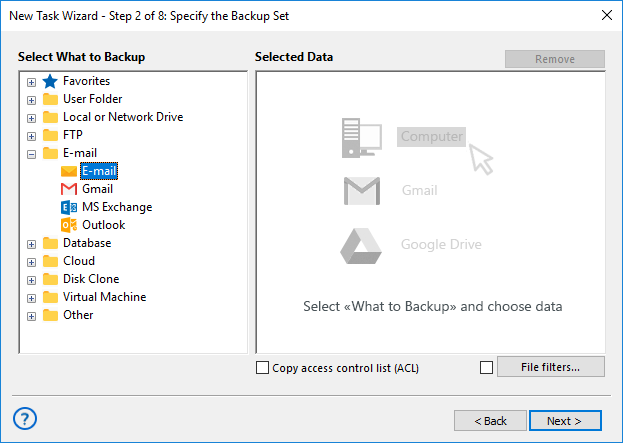
Select the E-mail plug-in. At the data selection step, choose the E-mail plug-in from the E-mail group.
-
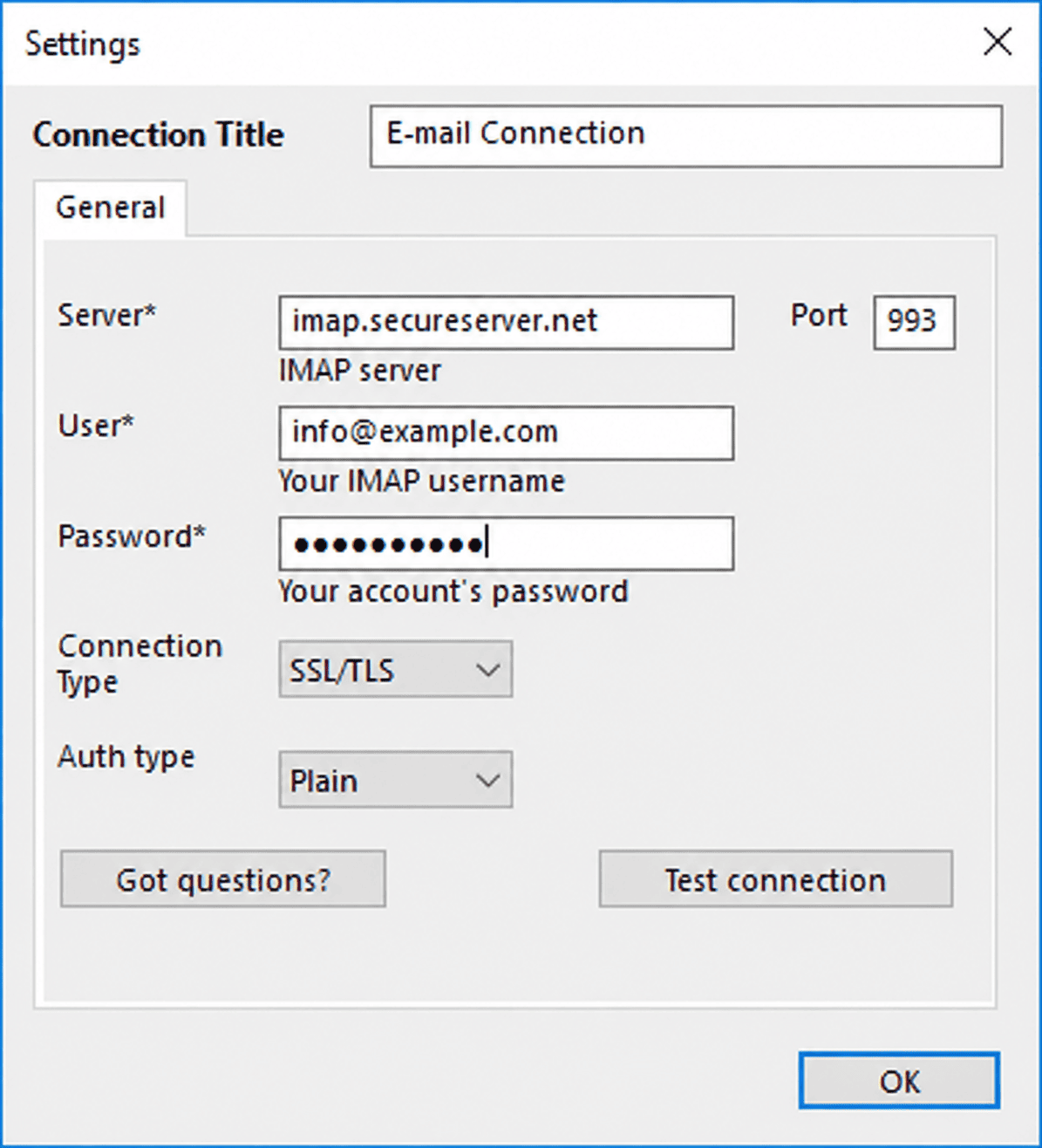
Create a connection. Enter your GoDaddy Professional Email address and mailbox password, then specify the incoming IMAP server settings.
GoDaddy Professional Email IMAP settings:
IMAP server: imap.secureserver.net
Port: 993
Security: SSL/TLS
Username: your complete email address
-
Select the mailbox data. Choose the GoDaddy email folders and messages you want to include in the backup task.
-
Choose a destination. Select a local disk, external drive, NAS, network folder, remote server, cloud service, or another supported storage location.
-
Configure automation. Set the backup schedule and configure versioning, encryption, notifications, and other required options.
-
Finish the task. Run the first backup immediately or let Handy Backup start it automatically according to the selected schedule.
Access GoDaddy Email Backups as EML Files
Each backed-up message is stored in EML format, preserving the email text, message headers, and attachments. This provides a practical advantage over backup systems that keep mailbox content accessible only through their own service interface.
EML is widely supported by email applications, so stored messages can remain useful even when the original GoDaddy mailbox is no longer the place where you want to keep or access them.
Messages and Attachments Together
Attachments remain inside the corresponding EML file together with the email content and headers. This helps preserve each message in its original form instead of separating attachments from the correspondence they belong to.

Independent Offline Access
A local GoDaddy email backup can be retained and browsed without signing in to the webmail account. This is useful for long-term correspondence, billing records, customer communications, and other messages that need to remain available after they leave the active mailbox.
One Backup Application for Email and Other Data
GoDaddy Email
Protect Professional Email mailboxes through IMAP and keep copies on storage independent from the webmail service.
Files and Folders
Use the same application for regular backup of documents, project folders, application data, and other files stored on Windows computers.
Cloud and Remote Data
Combine email protection with other supported local, network, remote, database, and cloud backup scenarios instead of using a separate utility for every data source.
FAQ About GoDaddy Email Backup Software
Can I back up GoDaddy email to my computer?
Yes. Handy Backup can connect to GoDaddy Professional Email through IMAP and save mailbox messages to a folder on your PC. You can also use an external HDD or SSD if you want the email backup stored separately from the computer's internal drive.
Can I automatically back up GoDaddy webmail?
Yes, for GoDaddy Professional Email accounts accessible through IMAP. After creating the mailbox connection in Handy Backup, you can schedule the task to run automatically instead of exporting email manually.
What are the GoDaddy Professional Email IMAP settings?
GoDaddy currently specifies imap.secureserver.net as the incoming server for Professional Email powered by Titan, using SSL/TLS on port 993. The username is the complete email address and the password is the mailbox password.
What format does Handy Backup use for GoDaddy email backups?
Handy Backup stores email messages as standard EML files. The message body, headers, and attachments are preserved together in the EML file, allowing the backed-up email to remain accessible independently from the GoDaddy webmail interface.
Can I back up several GoDaddy email accounts?
Yes. You can configure separate backup tasks for multiple mailboxes. Each task can use its own GoDaddy email connection, backup schedule, destination, versioning rules, and encryption settings.
Does IMAP backup include GoDaddy contacts and calendars?
No. The IMAP method is intended for email messages and mailbox folders. Contacts, calendars, tasks, and other non-email data are not part of an IMAP mailbox backup and should be protected separately when required.
Can I keep a GoDaddy email backup on a NAS or external drive?
Yes. GoDaddy email backup tool - Handy Backup supports local disks, external storage, network folders, and NAS devices as backup destinations. This allows you to keep a GoDaddy email archive independently from the online mailbox.
Can I restore individual GoDaddy emails?
Yes. Because Handy Backup preserves individual messages as EML files, specific backed-up emails can be accessed separately instead of requiring recovery of one large mailbox archive.