Backup to FTP: Servers and Workstations to Reliable Storage
Backup to FTP is a wise choice for anyone who requires security of backups. FTP servers are located remotely and deliver the maximum protection of critical data from destruction or theft. Handy Backup provides an effective and comprehensible way to configure multicloud automatic backups to remote FTP locations.
 Download for Free
Version 8.7.2, built on June 23, 2026. 152 MB
30-day full-featured trial period
Our software is designed for Windows 11, Windows 10,8,7 and Windows Server 2025, 2022, 2019,2016. The basic features related to FTP backup are as follows:
- Convenient FTP management interface. Our product features a user-friendly interface which allows you to easily create and choose folders on the FTP server to store your backups. Authorization on the FTP server is achieved through the use of MD4/MD5 passwords which provide reliable protection of your login information.
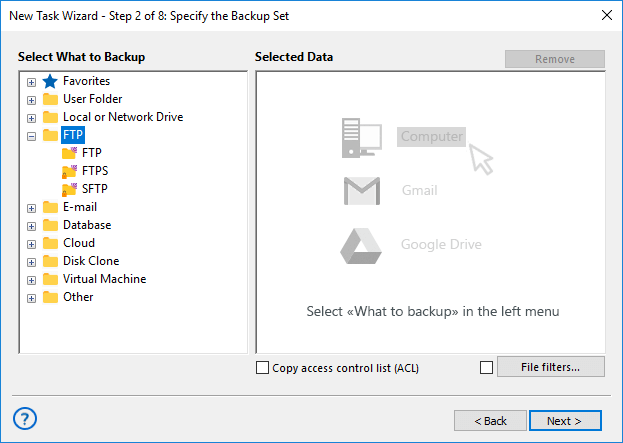
- Backup to FTP or to secure SFTP servers. Besides common FTP protocol the featured tool supports backing up to SFTP servers which provide higher level of data transferring security. Read more about backup to SFTP.
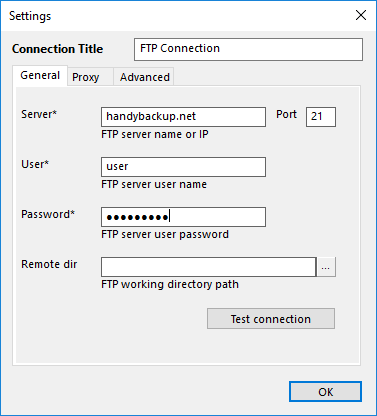
- Easy configuration of FTP backup. The software features an advanced transfer engine which allows backing up data to FTP in cases when computer is behind a proxy server (FTP or SOCKS5/SOCKS4). All you need is to specify the desired FTP or SFTP site name and login data.
- A variety of backup options. The utility features numerous backup options which allow compressing your data with ZIP64, encrypting it with 128-bit blowfish algorithm, running backup to FTP as Windows service, etc. Flexible scheduler allows repeating your FTP backup on daily, weekly, or monthly base, or by your own interval (e.g. by running several times a day).
Recommended Solution
Lifetime license

Home Office Backup Solution
The Backup to FTP feature is included into all versions and editions of our software. Get one today - free 30-days trial!
FTP vs Cloud
Backup to FTP:
Backup to FTP offers simplicity and control, with an ease of setup and use, allowing users to dictate where and how their data is stored. Its user-friendly interface requires minimal IT resources, making it accessible to small businesses. Moreover, traditional FTP, supplemented by options like SFTP and FTPS, enhances security measures. Despite security concerns, FTP remains cost-effective compared to cloud services, making it a budget-conscious choice.

Backup to Cloud:

Conversely, multi-cloud data backup ensures unmatched reliability and accessibility through redundant servers and data centers, safeguarding against hardware failures and disasters. Automation minimizes human error, maintaining up-to-date backups. However, cloud solutions can be more expensive compared to FTP, which may pose budgetary challenges.
Time for Reliable Backup to FTP
If you are searching for a program that can backup to FTP, Handy Backup is just what you need. It has a very user-friendly interface, simple procedure of backup data selection and has the widest range of different backup options and features.
Video Tutorial: Learn How to Backup to FTP with Handy Backup
See the next video to learn how simple and efficiently you can backup to FTP server remotely with the dedicated Handy Backup plug-in.
Download for Free
Version 8.7.2, built on June 23, 2026. 152 MB
30-day full-featured trial period
With Handy Backup you may always rely on your backups and feel sure you will be able to restore your data easily and error free!