How to Use Post Operation Actions to Shut Down a PC After Backup
Many users run backup tasks at the end of the workday and leave their computers on until the tasks are completed. To avoid keeping the system running unnecessarily, you can configure the PC to shut down automatically after the backup tasks finish.
This example is based on a real user request to automatically shut down a computer after all Handy Backup tasks had completed.
User Background
I work as a system administrator for a small office-based company. We use a MySQL database for our internal CRM and website-related data. We also keep important working files in shared folders, including contracts, client documents, spreadsheets, and project materials, so I need to back up both the database and these folders after the working day.
The Backup Scenario
I like the program. Everything is intuitive, clear, and easy to use. My task was to create a backup copy of a MySQL database after the working day, and then, once this task is completed, run another task to back up the required folders. Everything works well. However, recently we have started having power issues in the office at night, so now I need the PC to shut down automatically after the last task has been completed successfully. I looked through the manual and FAQ but couldn’t find how to do this. Could you please advise me on how to set it up?
Suggested Solution
Yes, you can shut down the PC automatically after the last backup task is completed. This can be configured through the post-operation action in the task settings.
Handy Backup supports pre- and post-operation actions, which allow you to run an external program, command, script, or batch file before or after a backup task. This can be useful for different automation scenarios, for example, stopping an application or service before backup, preparing a database for copying, connecting a network resource, running a custom script, starting another process after backup, or shutting down the computer when all operations are finished.
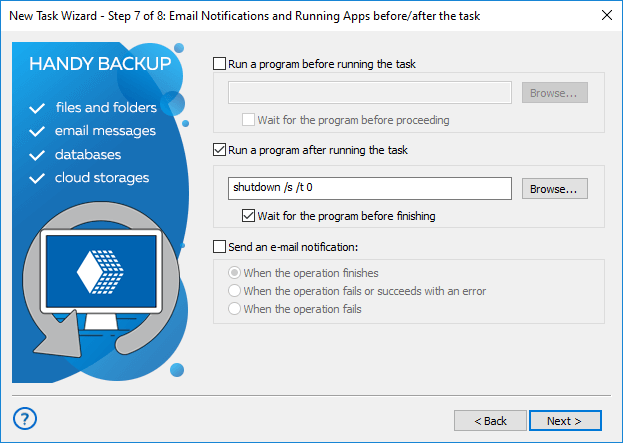
Please open the settings of the last task in your backup sequence, for example, the task that saves the required folders, and go to the Pre/Post-Operation Actions step. This step is available in Advanced Mode.
Then enable the option: Run a program after running the task
In the command field, enter:
shutdown /s /t 0
You can also enable the option to wait for the program before finishing, so the task will not be considered fully completed until the command has been executed.
After this, Handy Backup will run the shutdown command when this task is finished, and the computer will be turned off automatically.
Since you have two tasks running one after another, we recommend adding this command only to the final task, not to the MySQL backup task. Otherwise, the PC may shut down before the second task starts.
Related to: