Netfirms Website Backup with Handy Backup
Netfirms Backup Software by Handy Backup lets you keep self-managed copies of website data outside your hosting account. Backups can be saved to local drives, NAS, network storage, FTP/SFTP servers, or cloud storage. Set your own schedule, keep multiple backup versions, and protect website files, MySQL databases, and email data. This gives you an additional recovery layer without relying only on backup copies maintained by the hosting provider.
 Download Trial




How Can I Create an Automatic, Independent Backup of a Netfirms Website?
You can create an automatic, independent Netfirms website backup by connecting Handy Backup to your hosting account through SFTP and copying the required website directories to storage that you control. Once the task is configured, backups can run automatically according to your schedule.

Connect to Website Files
Use SFTP to access the website directories available through your Netfirms hosting account and select the files and folders that should be protected.

Run Backups Automatically
Create a regular schedule instead of downloading website files manually. Run the task daily, weekly, monthly, or at another interval suitable for your site.

Keep an Independent Copy
Store another copy outside the hosting environment on a local drive, NAS, network location, remote server, or supported cloud storage for additional recovery options.
Netfirms Backup and Restore: Built-in and Independent Options
Netfirms provides its own Website Backup & Restore service for protecting hosted website data. The service can create automatic backups and restore website files directly within the hosting environment. Handy Backup does not replace these tools; it can complement them with an independent backup stored in a location selected by you.

Netfirms Website Backup
Netfirms currently provides automatic website backups with recovery points available for up to 14 days. Depending on the selected service, users can restore an entire website or selected files and databases directly through the hosting backup interface.
Independent Backup
Handy Backup creates another copy outside the built-in Netfirms recovery system. You decide where backups are stored, when tasks run, which versions are retained, and how website files fit into your wider data protection routine.
Why use both? Hosting backup provides convenient recovery inside the Netfirms environment, while an independent copy gives you another recovery source under your control. The two approaches can work together rather than replacing one another.
Why Keep a Netfirms Backup Outside Your Hosting Account?
An independent backup reduces reliance on a single hosting environment. If a required restore point is no longer available, website files are accidentally changed, or you need to move data elsewhere, you still have a separate copy in storage that you manage.
Separate Storage
Keep copies independently from the live hosting account. Website data can remain available from your selected backup destination even when the original hosting environment cannot be used.

Multiple Versions
Maintain several recovery points according to your own backup settings. Earlier versions can be useful after unwanted edits, damaged files, configuration problems, or other website changes.
Controlled Recovery
Restore the website files you need from your own backup storage instead of depending exclusively on the recovery points and procedures available through the hosting service.
Netfirms SFTP Backup for Secure Website File Transfer
For an independent Netfirms SFTP backup, Handy Backup can connect directly to website files using the SFTP access provided by Netfirms. SFTP transfers data through an encrypted SSH connection and is preferable when secure file transfer is required.

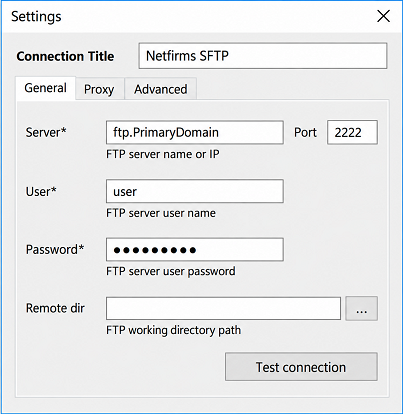
Host: use ftp.PrimaryDomain, where PrimaryDomain is the primary domain configured for the hosting account.
Port: use port 2222 for SFTP connections.
Credentials: enter the username and password for the appropriate Netfirms FTP account.
Security tip: Netfirms allows additional FTP users with access limited to selected website folders. When appropriate, use a dedicated account for backup access instead of sharing the primary hosting credentials.
Netfirms Built-in Backup vs. Handy Backup Software
Both approaches can protect website data, but they solve different parts of the backup process. Netfirms focuses on recovery within its hosting environment, while Handy Backup is designed to create and manage an additional backup copy in storage selected independently from the hosting account.
| Backup Feature | Netfirms Built-in Options | Handy Backup |
|---|---|---|
| Website file backup | Yes through Website Backup & Restore | Yes through SFTP or FTP access |
| Database backup | Yes supported by Website Backup & Restore plans | Available when suitable database access or an exported database file is available |
| Automatic website backup | Yes according to the selected Netfirms service | Yes user-defined task schedule |
| Independent copy outside Netfirms | Manual available backups can be downloaded | Yes automatically to the selected destination |
| Local drive or NAS storage | Manual requires downloading the backup | Yes |
| User-defined retention | Service-defined built-in backups are available for a limited period | Yes controlled by task and storage settings |
| Other PCs and business data | No focused on hosted website data | Yes can be managed in the same backup application |
Note: Netfirms currently states that Website Backup & Restore can provide access to automatic website backups for up to 14 days. Features and backup frequency can vary according to the selected plan.
Recommended Solution
Lifetime license

Handy Backup Small Business
Handy Backup Small Business automates Netfirms website backups via SFTP and protects website files, databases, and other business data with independent local, NAS, remote, or cloud copies.
What Can a Netfirms Website Backup Include?
A website may contain several types of data that need to be protected together. For a typical Netfirms-hosted site, this usually means website files plus the database used by a content management system, online store, or another dynamic application.
Website Files
Back up HTML pages, scripts, images, themes, plugins, uploaded content, configuration files, and other website data accessible through the hosting file system. Handy Backup can retrieve selected directories through SFTP or FTP.
Preserve the directories and configuration files required by your website. Keeping the original folder structure makes it easier to restore the site to the same hosting account or transfer its files elsewhere.

Website Databases
Dynamic sites can store posts, page content, users, settings, orders, comments, and other information in a database. Protect this data together with website files when a complete site recovery requires both components.
When suitable remote database access is unavailable, export the database using the available hosting tools and include the resulting SQL file in the regular website backup routine.
Choose Where to Store Netfirms Website Backups
A third-party Netfirms backup solution gives you control over the destination instead of keeping every recovery copy inside the hosting environment. Select storage according to recovery speed, retention requirements, available capacity, and how independently the copy should be kept.
Local and External Drives
Save website copies to a PC drive, external HDD, SSD, USB storage, or another directly attached device. Local storage provides convenient access when a quick file-level recovery is required.

NAS and Network Storage
Store backups on shared folders, network drives, or NAS devices to keep website copies on infrastructure that you manage independently from the hosting account.

Cloud and Remote Storage
Send copies to supported cloud services, S3-compatible storage, FTP/SFTP/FTPS servers, or another remote destination when you need an additional off-site backup location.
Automate Netfirms Backup Tasks
Flexible Scheduling
Run Netfirms website backup tasks automatically instead of downloading files by hand. Configure daily, weekly, monthly, or other schedules according to how frequently the website changes.
Backup Versions
Use full, incremental, or differential methods where appropriate and keep several versions of protected files. Additional recovery points can help after accidental edits or damaged website data.

Secure Backups
Transfer website files through SFTP and use backup encryption when required. These options help protect data both while it is transferred and while backup copies are kept in storage.
How to Backup a Netfirms Website with Handy Backup
Here is how to backup a Netfirms website automatically through SFTP. Before starting, make sure you have the correct Netfirms FTP/SFTP username, password, primary domain, and access to the website directories that you want to protect.
- Create a new backup task. Open Handy Backup and choose to create a backup task in the required mode.
- Select SFTP as the data source. On the data selection step, choose the SFTP plug-in and create a new connection.
- Enter the Netfirms connection settings. Use ftp.PrimaryDomain as the host, enter port 2222, and provide the appropriate FTP account credentials.
- Test the connection. Make sure Handy Backup can access the Netfirms hosting space before continuing.
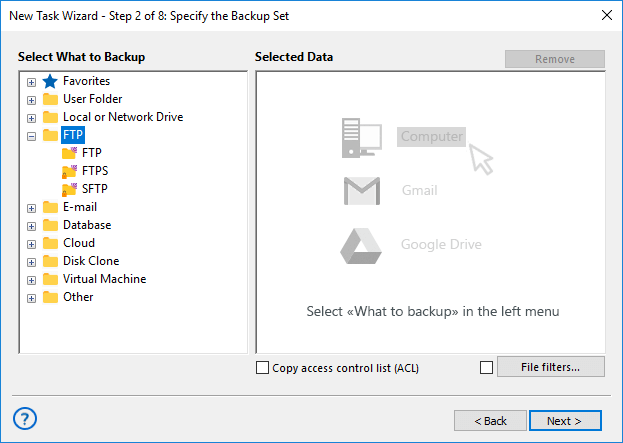
- Select the website directories. Choose the site folders and files that should be included in the backup.
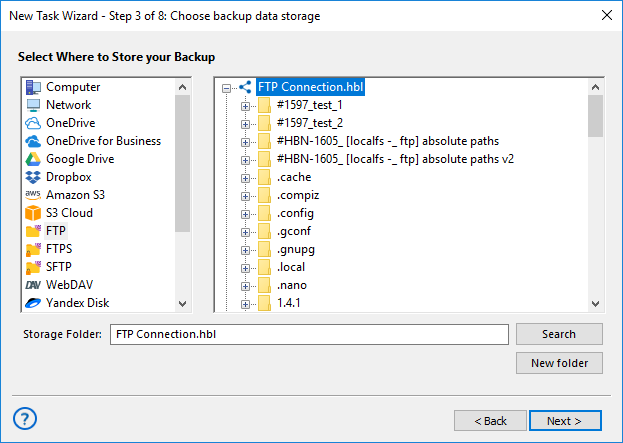
- Choose a destination. Save the copy to a local drive, NAS, network storage, remote server, supported cloud service, or another available destination.
- Configure backup options. Set the required backup method, versioning, encryption, and other task parameters.
- Set the schedule. Choose when the backup should run automatically and save the task.
For a complete dynamic website: website files alone may not contain all site data. If the website uses a database, protect the corresponding database or its exported SQL file as part of the overall Netfirms backup and restore strategy.
Protect Netfirms Email Alongside Website Data
A Netfirms hosting account can also include domain-based email, so important business information may exist outside the website itself. Customer messages, invoices, project correspondence, order details, and other records stored in mailboxes can be protected together with the rest of your hosted data.
Handy Backup can connect to Netfirms mailboxes through IMAP and copy selected folders on a schedule. Messages are saved as individual EML files, allowing email archives to be stored independently from the live mailbox and kept together with website and other business backups.
For secure IMAP access, Netfirms currently uses imap.netfirms.com with port 993 and SSL. Create separate backup tasks for individual mailboxes when different schedules, storage locations, or retention periods are required.

Tip: Website and email backups can use different tasks while remaining available in the same Handy Backup environment. This makes it easier to separate mailbox retention from website backup schedules without using a different backup application for each type of data.
Backup Netfirms and Other Data in One Application
Handy Backup is not limited to a single hosting provider. Website backup tasks can be managed together with backups of local files, network data, databases, email, supported cloud services, and other sources available in the selected edition.
This is useful when a Netfirms website is only one part of the data that needs protection. Each task can have its own source, destination, schedule, backup method, versioning, and security settings while remaining available through the same backup interface.
FAQ About Netfirms Backup Software
Does Netfirms provide website backup and restore?
Yes. Netfirms provides Website Backup & Restore for hosted website data. The service currently offers automatic backup functionality with recovery points available for up to 14 days, along with options for restoring websites, files, and supported databases.
How can I create an automatic, independent backup of a Netfirms website?
Connect Handy Backup to the website files through Netfirms SFTP access, select the required directories, choose storage outside the hosting account, and configure a schedule. The task can then copy website files automatically without requiring you to download them manually each time.
Does Netfirms support SFTP backup?
Netfirms supports SFTP access to hosted website files. The current Netfirms configuration uses the FTP host based on the account's primary domain and port 2222 for SFTP. Handy Backup can use this connection to retrieve selected website directories for backup.
Why use Netfirms backup software if built-in backups already exist?
The built-in Netfirms service is useful for recovery inside the hosting environment, while third-party backup software can maintain another copy in storage that you control. This gives you more flexibility over backup location, scheduling, version history, and long-term retention.
Can I save a Netfirms website backup to my computer or NAS?
Yes. Handy Backup can copy website files obtained through SFTP or FTP to local storage, external drives, supported NAS and network locations, or other available destinations. This allows a Netfirms website backup to be stored independently from the hosting account.
Can Handy Backup restore individual Netfirms website files?
Yes. You can recover selected website files from your backup rather than restoring every item when only part of the site needs to be recovered. Restored files can then be returned to the required website location using the appropriate hosting connection.
Should I back up the website database separately from Netfirms website files?
For a dynamic website, usually yes. Website files and database content perform different roles, and a complete recovery may require both. When direct database backup is not available, an exported database file can be included in the wider website backup routine.
Is Netfirms now part of Network Solutions?
Netfirms currently describes the service as becoming Netfirms by Network Solutions. Existing customers can continue using their current Netfirms login and services, so the website backup methods described on this page remain relevant to Netfirms hosting accounts.