Synthetic Backup
Synthetic backup is a new feature that we plan to add to Handy Backup in the nearest future. The idea is to synthesize a full backup while running an incremental or differential backup job.
This approach is faster than copying entire data, consumes a lot less bandwidth in network-based schemes, and allows planning backups in a more flexible and smarter way.
At present, our software supports full, incremental and differential backup.
 Download Trial
To illustrate the concept of synthetic backup, let’s compare different types of backup and what it takes to restore data in different situations:
- Full backup is a method when you always copy an entire set of data. Recovery in this scheme is as simple as copying all files from a backup to original place. The downside is that it is slow, requires a lot of disk space to store backups, and slows down network in network-based backups.
- Incremental backup is based on detecting new and modified files and saving only them. Backing up changes is faster than creating a complete copy, and also enables you to save multiple versions of data with smaller consumption of disk space. Rolling back to any particular point in time requires you to have all the preceding increments, and is of course slower than full backup. Learn more about incremental backup...
- Differential backup contains all changes made since the full backup. Unlike incremental backup, it only depends on the first copy, and allows calculating byte-level differences, rather than working with complete files.
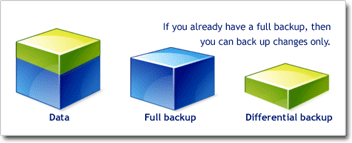
Differential backup: changes are calculated from full backup
The new Synthetic Backup feature will allow you to create a full backup not by reading original data, but through the use of existing incremental or differential backups. To a certain extent, this operation is similar to common restoration, with the main difference that the data is copied not to the place it was taken from, but to the same storage, thus saving time and resources required for transferring data.
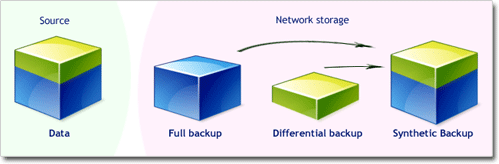
Synthetic backup: synthesizing full backup in storage destination
The feature will be available in the Professional edition of our software. We welcome you download and try it right now – it’s a perfect solution for any home or business computer!
Recommended Solution
Lifetime license

Handy Backup Professional
To back up your files, e-mails, system and databases, you need the Professional edition of our software. Free 30-days trial version!
See Also Other Pages Coming Soon:
- Proxmox Backup VM Server Software Solution | Coming Soon
- Amazon EC2 Backup and Recovery Strategy
- ESXi Backup Software for Virtual Machine Datastore Configuration
- Amazon RDS Automated Backups and DB Snapshots
- Thunderbolt Backup: the Fastest of Hard Drive Storage
- Database Clone Software
- Database Sync Software
- Distributed backup solution for corporate networks
- Mobile Phone Backup and Synchronization
- OpenLDAP Backup and Restore for LDAP Database Server | Coming Soon
- Active Directory Backup and Restore Solution for Windows Server