BlueMail Backup Tool
BlueMail Backup Software refers to a specialized solution for securely backing up your email messages from the BlueMail email client. With Handy Backup, you can effortlessly automate the process of preserving your important emails, ensuring fast and reliable recovery in case of data loss.
Download the free trial version of Handy Backup today and discover a high-quality, reliable solution to backup BlueMail emails effortlessly. Protect your emails with ease, thanks to our user-friendly software that guarantees seamless backup and restore processes!





Why You Need a BlueMail Backup Tool

- Switching Platforms: Easily transfer your emails when performing email migration to another email client or service.
- Offline Access: Keep your emails accessible even without an internet connection, ideal for travel or unreliable networks.
- Legal Requirements: Ensure compliance with regulations that require you to store communications for a certain period.
- Archiving: Safely store old emails for future reference or record-keeping without cluttering your inbox.
Powerful Features of Handy Backup for Efficient BlueMail Backup

Encryption
Secure your email backups with top-tier encryption methods like AES-256, AES-128, and Blowfish. Rest assured your data remains protected from unauthorized access, even in the cloud.

Automated Scheduling
Automate your backup processes with flexible scheduling options. Set it once, and our BlueMail Backup Software will take care of everything, ensuring your data is always up-to-date without manual intervention.

Email Notifications
Stay informed with detailed backup reports sent directly to your inbox. Gain full control and insight over your backup processes, knowing exactly when and what data was backed up.

EML Format Backup
Back up your emails in the widely used EML format, allowing easy access to individual messages without the need for a full restore. It’s fast, flexible, and incredibly convenient for selective retrieval.

21 Supported Languages
Enjoy Handy Backup in your native language! With support for 21 different languages, seamlessly navigate and use the software, ensuring a smooth and intuitive BlueMail backup experience wherever you are in the world.

Windows Compatibility
Enjoy flawless compatibility with all modern versions of Windows, including 11, 10, 8.1, and 7. Whether you're using the latest or older systems, Handy Backup has you covered.

User-Friendly Interface
Experience a clean and intuitive interface with Handy Backup, designed to make even advanced backup tasks easy to execute, perfect for both beginners and professionals alike.

Lifetime License
Get cost-effective solutions with Handy Backup’s four versatile editions, designed to meet all your needs. Each edition comes with a lifetime license, so pay once and enjoy full benefits without any ongoing fees.
Recommended Solution
Lifetime license

Handy Backup Standard
With our Handy Backup Standard Edition, you can effortlessly backup BlueMail and other popular email services with ease! Try our 30-day trial of this top-tier BlueMail backup software to experience seamless data protection and peace of mind. Don't miss the opportunity to safeguard your emails today!
How to Download BlueMail Emails to PC
To back up your BlueMail emails using Handy Backup, the first step is to export your emails to local storage. BlueMail offers several built-in tools for this purpose:
Easily save individual emails in EML format, perfect for retaining full message details. However, managing multiple emails can be time-consuming.
You can export individual emails as PDFs for clean, shareable documents. However, this method becomes cumbersome for large volumes.
Save all emails in one go by exporting them in MBOX format. Keep in mind, this feature requires a paid BlueMail+ subscription.
How to Backup BlueMail Emails from Local Storage with Handy Backup
- After exporting your emails, create a new backup task in Handy Backup. Under the "Local or Network Drive" category, select the Computer plug-in, and navigate to where you saved your BlueMail emails.
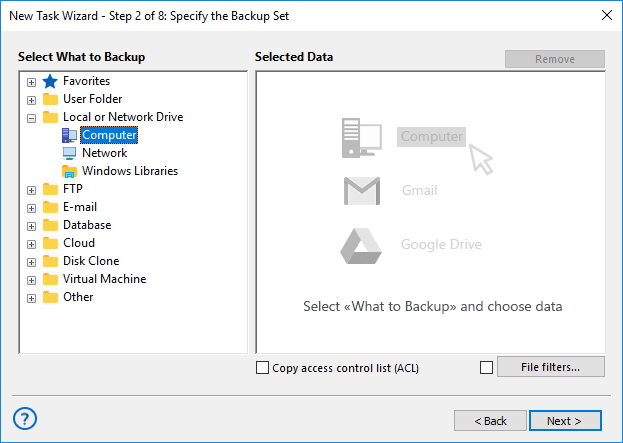
- Select all folders and emails you wish to back up or choose specific ones. In the next step, decide where to store your backup, such as for email migration or cloud backup to leading services.
How to Backup BlueMail Emails Using IMAP
- Alternatively, you can back up your BlueMail emails directly through the IMAP protocol using the Handy Backup Email plug-in.
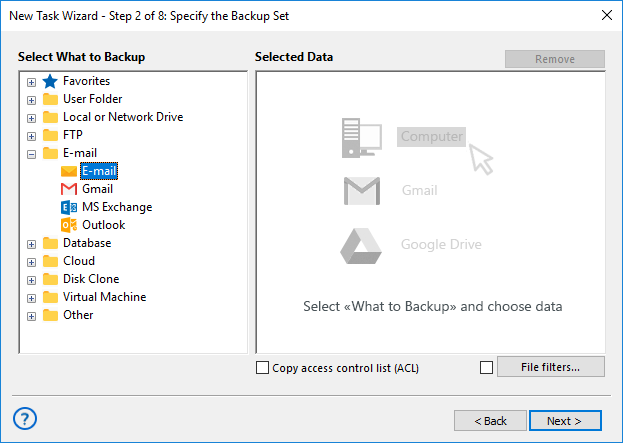
- Simply connect to your email account via IMAP. The image below illustrates connecting to Google services for performing Gmail backup.
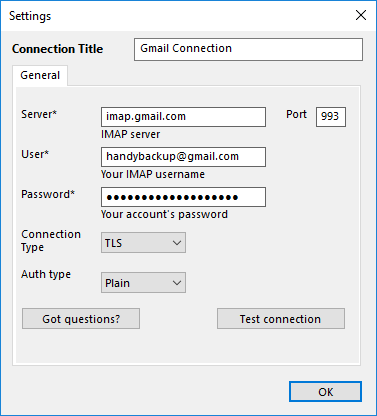
For more information about backing up other email services, check out our dedicated pages:




- If you activated the Advanced Mode option in the first step, customize additional features like encryption, compression, automated backups, and more.
FAQ on BlueMail Backup Tool
- Can I back up multiple BlueMail accounts?
Yes, Handy Backup allows you to back up multiple BlueMail accounts, ensuring all your email data is secure, no matter how many accounts you use.
- Are there any limitations on the size of the backup?
No, there are no limits on the size of the backup. Handy Backup can handle both small and large-scale backups efficiently, including emails with large attachments.
- Why should I use incremental or differential backups for BlueMail? Are they convenient?
Incremental and differential backups save time and storage by only backing up changes made since the last backup. Handy Backup supports both methods, making it highly convenient for frequent backups, especially for users with large email accounts or frequent updates.
Ready to protect your BlueMail emails and keep them secure? Download a free 30-day trial of our top-tier BlueMail backup software and enjoy effortless email backup with advanced features just a click away. Don't wait until it's too late—start your backup journey today!
 Download Trial
Capterra′s Rating:

"Great product, very simple and effective backup program"