MariaDB backup strategy provides a solid foundation for reliable operation in production environments. Proper planning helps prevent data loss, corruption, and unexpected downtime. Following MariaDB backup best practices keeps databases consistent, recoverable, and maintains operational continuity. Regular verification and structured backup workflows make recovery predictable and reliable in any scenario.
April 08, 2026
Backup Architecture Overview
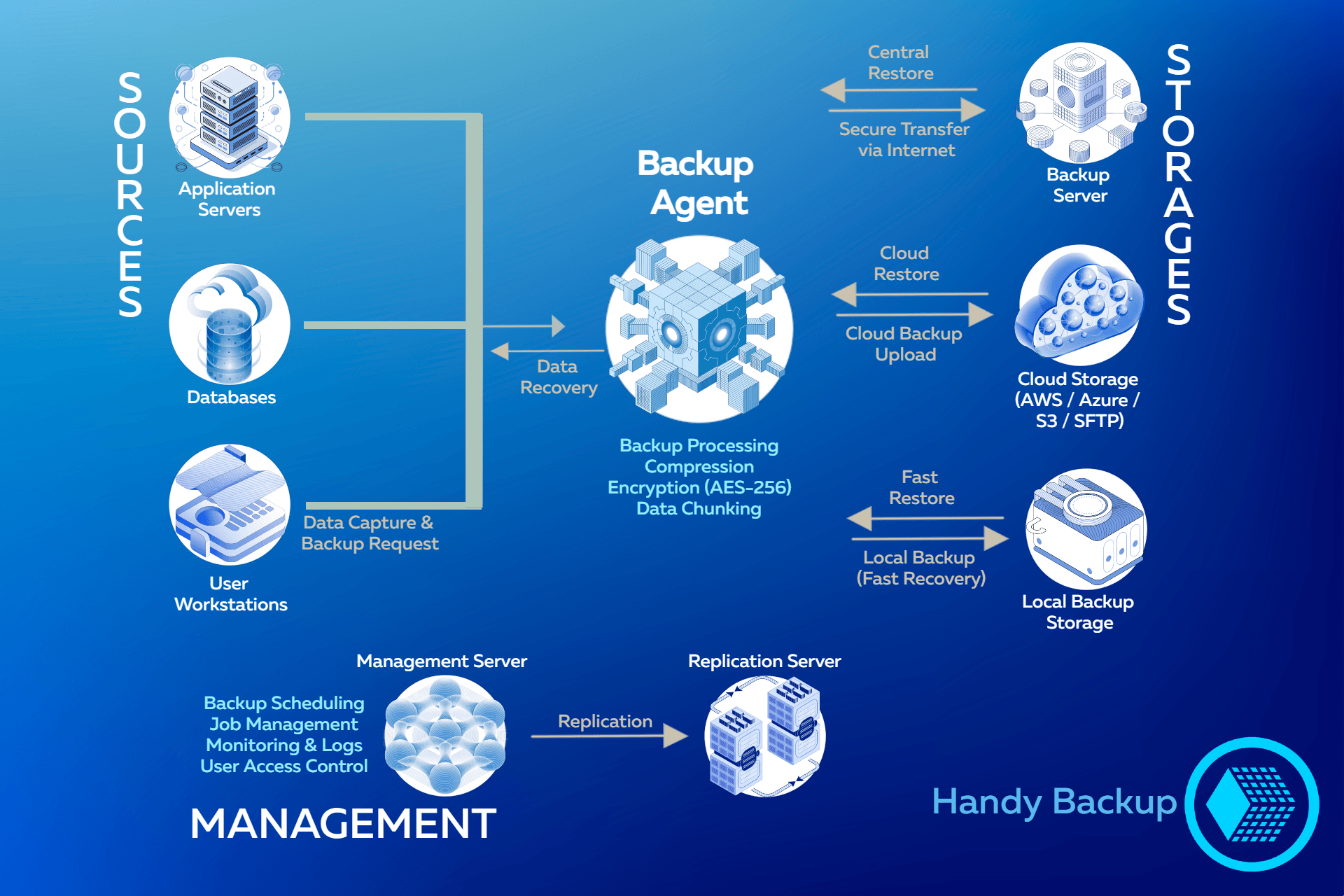
This architecture describes a generalized end-to-end backup workflow used in modern distributed systems, covering data collection, processing, transfer, storage, and recovery across heterogeneous environments such as databases, application servers, and user systems.
- Data Sources
- Sources: application servers, databases, virtual machines, and end-user systems.
Backup workflows originate from live production systems where data is actively created and modified.
- Backup Agent Layer
- Function: performs local data capture, preprocessing, compression, and encryption before transfer.
Processing data at the source reduces network load and improves backup efficiency by minimizing transferred payload size.
- Data Transfer Layer
- Process: securely moves backup data from source systems to storage endpoints.
Data is transmitted over secure channels using supported network protocols and can be routed to multiple destinations.
- Storage Layer
- Local Storage: optimized for fast recovery and low-latency access.
- Backup Server: acts as a central storage and coordination point for backup data.
- Remote / Cloud Storage: provides offsite redundancy and disaster recovery capabilities.
A multi-tier storage strategy balances performance, availability, and resilience across different failure scenarios.
- Management Layer
- Functions: scheduling, policy enforcement, job orchestration, monitoring, and logging.
Centralized management ensures consistent execution of backup policies and reduces configuration complexity across distributed environments.
- Replication Layer
- Function: creates additional copies of backup data across storage locations.
Replication improves fault tolerance and protects against storage or site-level failures.
- Data Recovery (Restore)
- Process: restores data from available backup copies to target systems.
Recovery operations can be performed from different storage tiers depending on required recovery time and data availability.
MariaDB Backup Best Practices
- Logical vs Physical Backups
- Logical Backup: exports SQL statements (tables, schemas, rows). Portable across environments and ideal for migrations or small datasets.
- Physical Backup: copies raw database files. Faster for large databases and preferred for full system recovery.
Choosing the right type depends on dataset size and restore requirements; combine both methods strategically for flexibility.
- Full vs Incremental Backups
- Full Backup: captures the entire database at a single point in time, ensuring a complete restore base.
- Incremental Backup: stores only changes since the last backup, saving storage and reducing network load.
Use MariaDB incremental backups to optimize resources, but maintain regular full backups for reliability.
- Point-in-Time Recovery (PITR)
- Binary Logging: enable binlogs to track all transactions for precise restoration.
- Recovery Procedure: apply binlogs after base backups to restore to any timestamp.
PITR allows precise recovery to a specific moment, reducing potential data loss in production environments.
- Hot Backups in Production
- Active Backups: capture data while the server is running, avoiding downtime.
- Transaction Safety: ensure backup tools handle in-flight transactions to maintain consistency.
Hot backups enable continuous operations, while cold backups remain an option when downtime is acceptable.
- Backup Verification and Consistency Checks
- Test Restores: validate backups by performing actual restores on a test environment.
- Integrity Checks: verify transaction consistency, table structures, and file completeness.
Regular verification ensures backup reliability and prevents silent failures during disaster recovery.
- Common Restore Pitfalls
- Frequent Errors: LSN mismatches, corrupted ibdata1 files, and permission issues are common challenges.
- Best Practices: follow structured restore workflows and maintain detailed logs for troubleshooting.
Planning for common restore issues ensures predictable and efficient recovery processes in production.
How Incremental Backups Work in MariaDB
MariaDB Incremental backups are powerful tools for optimizing storage and reducing backup windows, but they often create confusion if not properly understood. Understanding the underlying mechanisms, such as the Log Sequence Number (LSN), is critical to ensure successful backup and restore operations.
Key Concepts:
- Log Sequence Number (LSN): Each transaction in MariaDB is assigned an LSN, which allows tracking changes across backup chains. Misalignment in LSNs during restore can cause errors or incomplete restores.
To learn more about common backup issues and how they occur, check our MariaDB backup errors guide.
- Backup Size Variations: An incremental backup may appear nearly as large as a full backup due to high database activity or large-scale data changes. Proper scheduling helps manage storage efficiently.
- Restore Chain: Incremental backups must be applied in chronological order after a verified full backup. Skipping or misapplying steps in the chain can lead to restore issues.
- Common Mistakes: Mariabackup errors often occur when incremental backups are applied out of sequence, LSNs are ignored, or files are corrupted. Regular validation and test restores help prevent failures.
- Best Practices: Automate backup schedules, monitor LSN progression, and periodically test restores to detect potential issues before disaster strikes.
MariaDB Backup in Production Environments
Backing up MariaDB in production environments requires careful planning to ensure high availability and data integrity under load. Enterprise systems often run continuously, making downtime unacceptable. Adopting a robust backup strategy is essential for minimizing risk while maintaining system performance.
Backup Under Load: Performing backups on active databases can impact performance if not managed properly. Scheduling backups during low-traffic windows or using hot backup techniques ensures minimal disruption and supports a stable MariaDB environment.

Locking Behavior: Understanding how MariaDB handles locks during backup operations is crucial. Proper configuration prevents transaction conflicts and avoids blocking critical queries, ensuring backups can run without affecting business operations.

Backup in Galera Cluster: In Galera cluster environments, backups must account for multi-node replication and consistency. Coordinated backups across nodes help avoid split-brain scenarios and maintain cluster integrity while supporting mariadb galera backup strategies.

Backup and Replication Interaction: When replication is enabled, backups should be aligned with replication logs and master-slave positions. This prevents inconsistencies and ensures reliable restores, directly addressing mariadb replication backup strategy concerns.

Binlog Strategy: Binary logs are critical for point-in-time recovery and incremental backup operations. Maintaining a clear binlog retention and rotation policy allows administrators to perform precise restores without data loss, supporting mariadb backup without downtime requirements.

Enterprise Backup Workflow: By combining these techniques—load management, locking awareness, Galera cluster coordination, replication alignment, and binlog strategy—production environments maintain continuous availability, safeguard critical data, and implement a backup workflow optimized for enterprise-scale operations.

How to Verify MariaDB Backups Before Disaster Happens
A backup is only as reliable as your ability to restore it. Many failures occur not during backup creation, but at the moment of recovery, when it becomes clear that data is incomplete, corrupted, or unusable. To avoid this, every backup strategy must include a structured verification process.
Test MariaDB Restore Regularly
The only definitive way to verify backup integrity is to perform an actual restore.

Restore backups to a separate test environment, not production
Validate that all databases, tables, and indexes are accessible
Check application-level functionality if possible (not just database startup)
Validate Backup Consistency
To check if backup is valid, consistency must be verified beyond file presence.
Ensure all required files are present, including data files, logs, and metadata
Confirm backup processes completed without errors by reviewing logs
Verify LSN continuity to ensure incremental backups can be applied correctly
Check binary logs if point-in-time recovery is required
Automate MariaDB Backup Verification
Automation is essential to reliably verify MariaDB backup in production environments.
Schedule automated restore tests to regularly test MariaDB restore procedures
Compare row counts or checksums between source and restored data
Monitor backup and restore logs for anomalies or silent failures
Trigger alerts when verification fails or inconsistencies are detected
Perform Disaster Recovery Drills
Regular drills ensure that MariaDB backup verification translates into real recovery capability.
Simulate real-world failure scenarios such as data corruption, crashes, or full outages
Measure recovery time and identify performance bottlenecks
Validate full, incremental, and binlog chains to ensure complete recovery
Keep recovery procedures documented and up to date
Key Takeaway
To reliably test MariaDB restore processes and ensure data safety, verification must be continuous, automated, and practical.
A valid backup is not defined by its existence, but by its proven ability to restore data completely and consistently when it matters most.
MariaDB vs MySQL Backup Differences
Although MariaDB originated as a fork of MySQL, backup strategies and tooling behavior have diverged significantly. Assuming full compatibility often leads to failed restores, broken backup chains, or subtle data inconsistencies.
Key Differences
| Comparison | MariaDB | MySQL |
|---|---|---|
| Backup Tools | Uses mariabackup (fork of Percona XtraBackup), tightly aligned with MariaDB internals | Uses MySQL Enterprise Backup or Percona XtraBackup depending on deployment |
| Tool Compatibility | mariabackup is not fully compatible with MySQL, especially newer MySQL 8+ features | XtraBackup works with MySQL but does not support all MariaDB-specific changes |
| Storage Engine Differences | Includes additional engines like Aria and MyRocks, requiring engine-aware backup handling | Primarily focused on InnoDB with standardized backup behavior |
| Data Dictionary | Relies more on file-based metadata, affecting physical backup structure | Uses a transactional data dictionary in MySQL 8+, changing backup consistency handling |
| Redo Log Format | Redo logs have diverged, making physical backups non-transferable to MySQL | Uses a different redo log structure, especially in MySQL 8+ |
| Binary Log (binlog) | Different event formats and GTID implementation variations | Standardized binlog format with MySQL-specific GTID behavior |
| Incremental Backup Logic | LSN handling differs due to engine and log format changes | More predictable within MySQL ecosystem but not cross-compatible |
| Version Compatibility | Independent versioning can introduce backup inconsistencies between releases | More linear evolution, but major changes in MySQL 8 impact backup tools |
| Replication Sync | Requires coordination in Galera Cluster environments | Aligned with master-slave or group replication models |
Practical Implications
- Mariadb vs mysql backup is not interchangeable in production tools and formats are tightly coupled to each ecosystem
- Is mariabackup compatible with mysql → No, not reliably, especially for physical backups and newer MySQL versions
- Mixing backup tools across MariaDB and MySQL can result in silent corruption or restore failures, not just obvious errors
Key Takeaway
The difference between MariaDB vs MySQL backup is not just tooling, it is rooted in internal engine behavior, log formats, and architectural decisions.
Backup strategies must always be designed specifically for the database system and version in use, not assumed interchangeable based on shared origin.
MariaDB Backup with Handy Backup
MariaDB provides powerful database capabilities, but building a reliable backup workflow often requires manual setup, scripting, and constant monitoring. Native tools lack centralized scheduling, flexible storage options, and user-friendly restore processes, especially in complex production environments. That’s why we recommend using Handy Backup as a dedicated MariaDB backup tool to automate backup tasks, simplify recovery, and ensure your data is always protected.
Key Handy Backup Features for MariaDB:
- Automated Backup Scheduling: Set up full or partial backups with flexible timing and no manual intervention.
- Hot Backup Support: Back up active MariaDB databases without downtime, ensuring continuous availability.
- Multiple Storage Destinations: Save backups to local drives, NAS, FTP/SFTP servers, or cloud storage for redundancy.
- Built-in Encryption and Compression: Protect sensitive data and reduce storage usage automatically.
- Easy Restore Process: Quickly restore entire databases or individual data sets without complex manual steps.
 Download Trial
Simplify your MariaDB backup strategy, download the free trial of Handy Backup and ensure fast, reliable, and fully automated data protection.
Frequently Asked Questions on MariaDB Backup
- What is the difference between logical and physical backups in MariaDB?
Logical backups export data as SQL statements, making them flexible and portable, while physical backups copy raw database files for faster recovery of large datasets. In practice, combining both approaches provides the best balance between flexibility and performance. Tools like Handy Backup help automate this process.
- Why do MariaDB backup and restore processes fail, and how can I prevent common errors?
MariaDB backup and restore processes often fail due to LSN mismatches, corrupted backup chains, missing files, or incorrect permissions. These issues usually result from manual workflows and lack of validation. Regular verification, consistent scheduling, and automated tools like Handy Backup help prevent failures.
- How do binary logs enable point-in-time recovery (PITR) in MariaDB?
Binary logs record all database transactions, allowing you to restore data to a specific point in time by replaying changes after a full backup. This is essential for minimizing data loss in production, but requires proper binlog management and consistent backup chains.
- How to check if MariaDB backup is valid?
To verify your backup, perform a test restore in a separate environment and confirm that all data is accessible and consistent. Additionally, check backup logs, file completeness, and LSN continuity. Automated tools like Handy Backup simplify and ensure reliable MariaDB backup verification.