PHPMyAdmin - Backup Database Automatically
phpMyAdmin backup is commonly used to create a manual logical copy of a MySQL or MariaDB database. An administrator opens phpMyAdmin, selects the required database, uses the Export function, and saves the resulting SQL dump or another export format.
This approach works well for occasional database copies, migrations, or a backup before making major changes. It becomes less convenient when the database needs to be copied repeatedly. A phpMyAdmin automatic backup normally requires an additional scheduling mechanism, script, hosting feature, or another backup tool rather than the standard browser workflow alone.
If you are looking for the general meaning, features, import/export capabilities, and purpose of the tool itself, see what phpMyAdmin.
How to Back Up a MySQL Database Using phpMyAdmin
If you need a one-time phpMyAdmin database backup, the standard Export function is usually the simplest method.

- Open phpMyAdmin and select the MySQL or MariaDB database you want to copy.
- Open the Export tab.
- Choose the Quick export option for a straightforward SQL dump, or Custom when you need more control over tables and export settings.
- Select SQL or another required export format.
- Start the export and save the resulting file in the required location.
The resulting SQL file is a logical database dump. It contains SQL statements that can later be imported to recreate database structure and data.
A manual export is useful before a website update, database migration, development experiment, or another operation where you need a current copy at a particular moment.
Can phpMyAdmin Back Up a Database Automatically?
phpMyAdmin itself is primarily a web-based database administration interface. Its normal Export workflow is interactive: a user selects a database, configures the export, and starts it from the browser.
Therefore, the phrase phpMyAdmin backup database automatically usually describes a workflow built around phpMyAdmin or the database rather than a native recurring backup scheduler inside the standard phpMyAdmin interface.
A phpMyAdmin scheduled backup can be implemented in several ways:
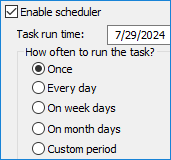
- Manual recurring exports. An administrator exports the database at regular intervals and stores each copy separately.
- Server-side scripts. A scheduled script or command-line database utility can create dumps automatically, with tools such as cron used to trigger jobs on Unix-like systems.
- Hosting or CMS tools. Some hosting panels, CMS plug-ins, or server-management systems can schedule database exports independently of phpMyAdmin.
- Dedicated backup software. Backup software can connect directly to the database and run scheduled tasks without requiring manual phpMyAdmin exports.
phpMyAdmin Backup vs. Automatic MySQL Backup
A manual phpMyAdmin export and an auto MySQL backup can create similar logical database copies, but the surrounding workflow is different.
| Capability | phpMyAdmin Export | Automatic MySQL Backup |
|---|---|---|
| Starting the backup | Usually started manually from the browser | Runs according to a defined schedule |
| Logical SQL dump | Yes | Yes, depending on the backup method |
| Recurring tasks | Requires another scheduling mechanism | Built into the backup workflow |
| Multiple backup versions | Managed manually | Can be retained automatically |
| Different storage destinations | Depends on export and server configuration | Can be assigned directly to the backup task |
| Logs and notifications | Not a complete backup-monitoring system | Can record task results and report failures |
Handy Backup can automate MySQL and MariaDB database tasks without requiring an administrator to open phpMyAdmin for every new copy. Learn more about the database plug-in on the MySQL Backup Software page.
 Download Trial
When Is phpMyAdmin Database Backup Enough?
A phpMyAdmin backup database workflow can be perfectly reasonable when database copies are required only occasionally.

Typical examples include creating a dump before changing a website, moving a database between servers, saving a development snapshot, or exporting selected tables for testing.
In these cases, opening phpMyAdmin and manually creating an SQL export may be simpler than configuring a recurring backup process.
The situation changes when the database is frequently updated or when an organization needs predictable recovery points. A busy website, CMS, online store, business application, or database-driven service may change many times between manual exports.
When Automatic MySQL Backup Makes More Sense
An automatic MySQL backup is more appropriate when copies must be created repeatedly without relying on someone remembering to open phpMyAdmin.
Scheduled Database Copies
A backup task can run every day, every week, at selected intervals, or according to another required schedule. This turns database backup into a repeatable process instead of a series of manual exports.


Multiple Recovery Points
Recurring tasks can keep more than the latest copy. Earlier database versions remain available when an unwanted change, corruption, or deletion is discovered after a newer backup has already been created.
Monitoring the Backup Process
Automatic backup is useful only when failed jobs are noticed. Logs and notifications can help administrators identify database connection, permission, storage, or task errors.

Using Handy Backup Instead of Manual phpMyAdmin Exports
Handy Backup can automate MySQL and MariaDB database backup as part of a broader backup workflow. Once the database connection and task settings are configured, recurring copies can run without opening phpMyAdmin each time.
Database and Application Data
Handy Backup can back up MySQL and MariaDB databases together with other application data. This can include database-driven websites and CMS content, files, folders, and other data that forms part of the same recovery plan.
For environments with multiple computers or database servers, Handy Backup also provides server backup capabilities.
Native SQL Format
When an uncompressed and unencrypted MySQL backup is created as an SQL dump, the resulting backup remains a sequence of standard SQL commands rather than being locked inside a proprietary database container.
This makes the dump useful not only for recovery but also for database migration, cloning, testing, or restoring data to another MySQL instance.


Backup to Different Storage Destinations
Handy Backup can place MySQL backups on local and external drives, network shares, FTP/SFTP servers, WebDAV storage, Amazon S3, S3-compatible storage, Google Drive, Dropbox, and other available destinations.
This is useful when the database needs both a nearby copy for routine recovery and another copy stored separately from the production server.
Can phpMyAdmin and Automatic Backup Be Used Together?
Yes. phpMyAdmin and automatic backup software solve different parts of database administration and do not need to replace one another.
phpMyAdmin can remain the everyday interface for browsing tables, running queries, managing users, importing files, and creating occasional manual exports. An auto MySQL backup task can run separately in the background to maintain recurring recovery points.
This combination is often more practical than trying to turn phpMyAdmin itself into a complete backup-management system.
A Practical MySQL Backup Workflow
For a database that changes regularly, a simple workflow can look like this:
- Use phpMyAdmin for Administration. Manage tables, records, users, queries, imports, and occasional exports through the familiar web interface.
- Automate the Recurring Database Backup. Create a scheduled task according to how much recent database activity you can afford to lose.
- Keep Several Backup Versions. Do not immediately overwrite the previous recovery point. Several versions can help when corruption or unwanted changes are discovered later.
- Keep Another Copy Separately. Store at least one backup away from the production database and its primary server so that one hardware or system-level incident does not affect every available copy.
- Test Database Recovery. Periodically import or restore a database copy into a test environment to confirm that the backup can actually be used when recovery is required.
Recommended Solution
Lifetime license

Handy Backup Small Business
The Small Business solution can serve instead of phpMyAdmin to backup MySQL database content in auto mode. All functions and plug-ins available out of the box!
phpMyAdmin Backup in Short
A phpMyAdmin database backup is usually a logical export created through the phpMyAdmin interface. It is a convenient way to make a one-time database copy, especially before migrations or changes.
For recurring protection, phpMyAdmin automatic backup requires another mechanism to initiate and manage the process. Scheduled backup software can provide automation, multiple versions, storage management, logging, and notifications while phpMyAdmin remains available for everyday database administration.
If your goal is specifically to backup a MySQL database using phpMyAdmin, use the Export function. If your goal is to back up a MySQL database automatically, use a scheduled database workflow rather than relying on repeated manual exports.
FAQ About phpMyAdmin Backup
How do I back up a MySQL database using phpMyAdmin?
Open phpMyAdmin, select the required database, go to the Export tab, choose Quick or Custom export, select SQL or another format, and start the export. The resulting file can later be imported to recreate the database structure and data.
Can phpMyAdmin back up a database automatically?
The standard phpMyAdmin export process is usually started manually. To create a phpMyAdmin automatic backup workflow, you need another scheduling mechanism, such as a server-side script, hosting tool, CMS extension, or dedicated backup software.
What is the difference between phpMyAdmin backup and mysqldump?
Both can create logical SQL dumps of MySQL data. phpMyAdmin provides a browser-based interface for export, while mysqldump is a command-line utility. mysqldump is easier to include in scripts and scheduled jobs, while phpMyAdmin is convenient for interactive administration and manual exports.
Is a phpMyAdmin export the same as a complete database backup?
A phpMyAdmin export creates a logical copy of database structure, data, or both. It can be enough for many migration and recovery tasks, but a complete backup process may also require scheduling, multiple versions, separate storage, monitoring, and recovery testing.
Can phpMyAdmin export a database in SQL format?
Yes. SQL is the most common phpMyAdmin export format. The file contains SQL statements that can later be imported to recreate database objects and restore data.
How often should a MySQL database be backed up?
The schedule should depend on how frequently the database changes and how much recent data can be recreated after a failure. A frequently updated website or application may need daily or more frequent backups, while a relatively static database may require fewer recovery points.
Can Handy Backup automate MySQL database backup?
Yes. Handy Backup can create scheduled MySQL and MariaDB backup tasks, keep multiple versions, write task logs, send notifications, and save copies to local, network, remote, and cloud destinations. See MySQL Backup Software for details.
Learn more:
- What Is phpMyAdmin?
"phpMyAdmin is a free, web-based administration tool written in PHP for managing MySQL and MariaDB databases. It provides a graphical interface for common…" - Database Replication
"Database replication is a process of synchronization in which data added to one database is automatically copied to the other. Replication should not be…" - Oracle VSS Writer Service
"VSS Writer Service is an addition to Windows Volume Shadow Copying Service (VSS) provided by an Oracle API, to allow access to open Oracle databases. Having…"